
The Seplos BMS app is a Bluetooth battery-monitoring application for compatible Seplos BMS 3.0 systems. Depending on the mobile operating system and app-store region, users may find it under names such as Seplos BMS, Seplos, Octopus BMS, or Octopus BMS Lite.
This guide explains how to download the BMS app for Android or iOS, enable the required Bluetooth and location permissions, connect to a compatible battery pack, and view real-time battery information.
1. Download and Install the App
- For Android Devices
- Open a browser on your phone.
- Copy and paste the following link: www.pgyer.com/be91fs
- Download and install the app from the webpage.


- For iOS Devices
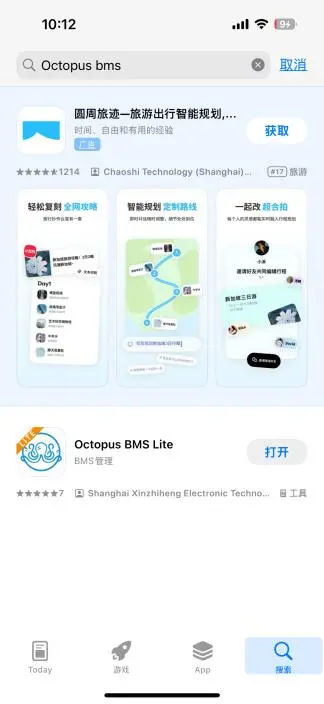
- Open the App Store.
- Search for Octopus BMS.
- Download and install the app.

2. Connect to the Bluetooth App
1. Turn on Bluetooth and Location Services on your smartphone.


2. Launch the Seplos/Octopus BMS App.

3. Tap the fourth icon in the app.


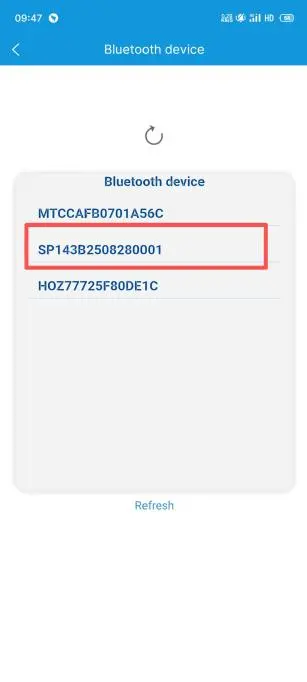
4. Select the displayed battery serial number to connect via Bluetooth.
Connecting the Seplos Bluetooth App
When using the Seplos Bluetooth app or Octopus BMS app, select the battery device that matches the serial number of your BMS. If several battery packs are nearby, compare the displayed Bluetooth device number with the label or serial information on the battery system before connecting.
If the BMS Bluetooth app cannot find the device, confirm that Bluetooth and location permissions are enabled, the phone is close to the battery, and the BMS is powered on. Close any other mobile device that may already be connected to the same Bluetooth module.

3. View Battery Data
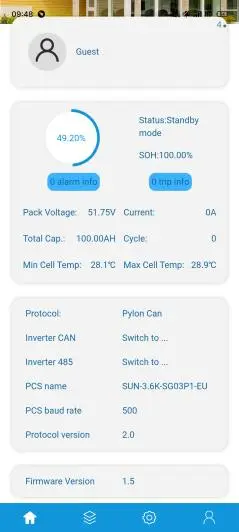
Once successfully connected, the app allows you to view real-time battery information:
- Basic Data:
View key battery status and switch battery communication protocols.
- Detailed Data (via the second icon):
- Battery voltage
- Temperature
- Cycle count
- And more system details

4. Important Notes
- Ensure both Bluetooth and Location permissions are enabled on your phone.
- When multiple batteries are connected in parallel, only the host battery’s serial number will be shown. Connect to the host to access data.
- The Bluetooth app is read-only. You cannot modify battery parameters.
- For parameter adjustments, please contact Seplos Technical Support.
With these steps, you can easily monitor your battery system using the Seplos 3.0 BMS Bluetooth App.
FAQs About the Seplos BMS App
The Seplos BMS app is a mobile battery-monitoring application for compatible Seplos BMS systems. It allows users to connect through Bluetooth and view battery voltage, current, SOC, temperature, cell data, cycle count, alarms, and other operating information.
The Octopus BMS app may be used with certain compatible Seplos BMS products. The exact app name can vary by mobile operating system, app-store region, BMS model, and Bluetooth module, so users should follow the download instructions provided for their specific system.
Yes. Compatible versions may be available for Android and iOS. Android users may download the app through the provided Seplos download page, while iOS users can search for the specified app in the App Store.
Some Android and iOS versions require location permission to scan for nearby Bluetooth devices. The app may not detect the BMS Bluetooth module unless both Bluetooth and the required location permissions are enabled.
Confirm that the BMS and Bluetooth module are powered on, the phone is close to the battery, Bluetooth and location permissions are enabled, and another phone is not already connected. You should also check that the app and Bluetooth module are compatible with the BMS version.
The app is mainly intended for monitoring battery information. Available parameter-setting functions depend on the app version, BMS firmware, user permissions, and product configuration. Contact Seplos technical support before changing protection or charging parameters.